Activating and Deactivating InvoiceNow
Before you can use InvoiceNow, you must turn on the eInvoicing MoneyWorks Service (see eInvoicing). Having set up your eInvoicing, you can turn on InvoiceNow by:
- Choosing Command>eInvoicing Settings
The eInvoicing settings window will open
- Turn on the Enable InvoiceNow checkbox
- Click OK to save the Settings
A new InvoiceNow command will be added to the Command menu. Use this to setup and manage your InvoiceNow requirements.
Note: You must have successfully setup eInvoicing before you turn on InvoiceNow.
The above makes InvoiceNow available, but it is not yet activated. To activate:
- Choose Command>InvoiceNow
The InvoiceNow Management window will open
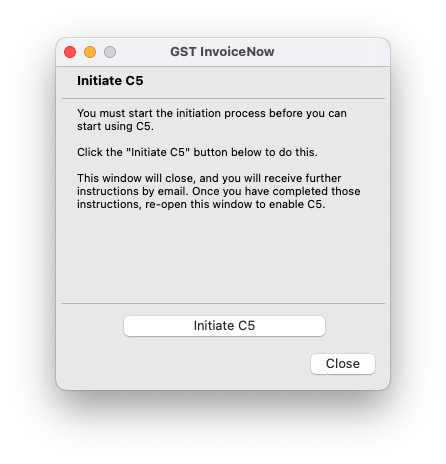
- Click Initiate
The window will close and a request will be sent to activate InvoiceNow.
You will receive an email with further instructions. Follow the steps on the email, and, once activation is confirmed
- Choose Command>InvoiceNow
The InvoiceNow Management window will open
- Click the Enable button
The window will close and additional InvoiceNow features will be enabled in MoneyWorks. Note that GST InvoiceNow will have been turned on regardless of this last step (so eInvoices will be submitted to IRAS), however you can only meet all the InvoiceNow requirements by completing this last step in MoneyWorks.
- If you didn't complete the addtional steps in the email and wish to not proceed, click the Terminate button.
Once InvoiceNow has been confirmed, you can apply to deactivate it by clicking the Deactivate button which will show in the GST InvoiceNow window:
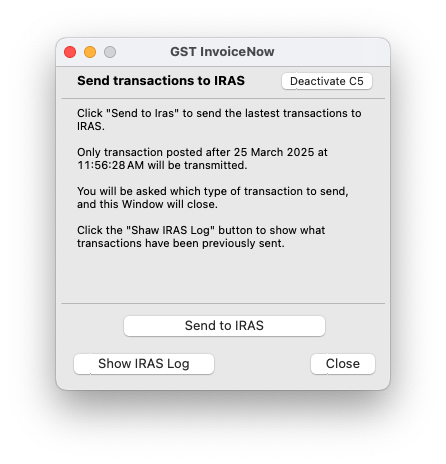
Again you will receive an email with further instructions.